


ВкусВилл: доставка продуктов
4.5122.00 Reviews
App Specs
- Version
- 26.17.5
- Updated On
- License
- Free
- Downloads
- 5,000,000+
- Developer
- VkusVill
- Categories
- Food & Drink
- Platform
- Android, iOS
Screenshots



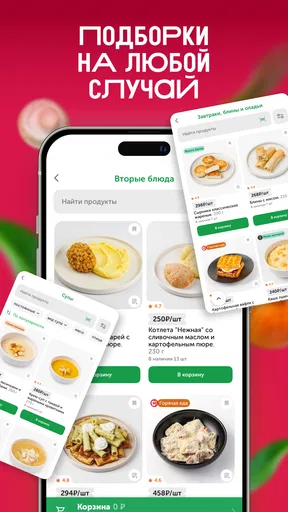
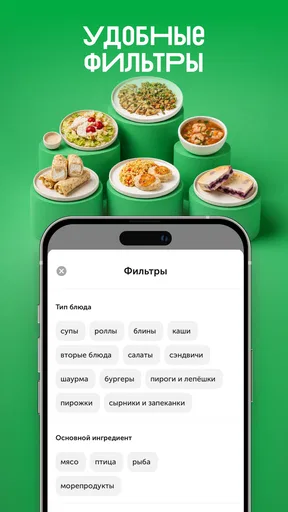


 Analysis by AppCompare
I would consider ВкусВилл when I want groceries delivered but don’t want to turn a quick restock into a trip through several shops. It is a food-and-drink app from VkusVill, focused on ordering groceries and food for home delivery. In day-to-day use, that promise is most useful when I already know roughly what I need and want to spend less time running errands. The app is free, though the convenience still depends on whether its selection and delivery options suit your location and plans.
Decide what you need before opening the app
One way I’d make a delivery order more useful is to write the meal or occasion at the top of my shopping list, not just the products. “Dinner tonight” or “breakfast basics” gives me a quick test for each addition: does this help with the plan, or am I browsing because the catalogue is open? That small habit can make a phone-based shop feel more intentional and reduce the chance of reaching checkout with a basket that has grown beyond the errand.
It also helps to separate items that can wait from those that matter today. If a product is missing or the available choice does not suit me, I can decide whether a substitute from the app’s selection works, whether to leave it out, or whether that one item justifies a separate local stop. I would rather make that decision while reviewing the basket than assume the whole delivery has failed because one part of the list is inconvenient.
Getting past the first-order friction
I’d use this section to focus on the small checks that make a first grocery order less of a gamble: confirming the delivery address early, keeping the initial basket modest, and reading each checkout screen before moving on. A first-order offer can be useful, but I’d treat it as a bonus and make sure the order itself works for my routine. From there, the next section looks at how to shape a basket around an actual day.
Check the basics before building a basket
A common snag with any grocery delivery app is discovering a limitation only after spending time choosing products. I’d start by checking that the app is available for my device and that my operating system meets its minimum requirement: version 8.0. Then I’d enter the delivery details the app asks for and see what it offers for the intended address before planning a full shop. That simple order of operations can save frustration if the service does not fit a particular delivery area or timing need.
The app’s store description highlights a promotional code for a first order, but I would treat that as a possible welcome perk rather than the reason to install it. If a code is presented during setup or checkout, read the conditions shown in the app and apply it before placing the order. A code that is easy to overlook can be more annoying than helpful if you only notice it after completing checkout.
My practical advice is to test the route with a small, ordinary basket first. Add a few items you genuinely need, check the address and checkout details, and confirm the order information before committing. This gives you a feel for the app’s flow without turning setup into a large shopping project.
Worth Reading Before You Choose

Flipboard Shows What News Apps Must Do Beyond the Feed

Switching to Android Auto Means Rethinking Your Driving Routine

Google Calendar Makes a Crowded Week Easier to Manage

Ludo King Makes the Most of the Minutes Between Plans

Baby Panda World Brings Quick Play to Modern Phones, but Its Game Library Feels Busy

ESPN’s Live Game View Makes Following Close Games Easier
Make the first shop easy to review
For a first order, I’d avoid adding every household staple at once. A short list makes it easier to notice whether the products are the right fit, whether the checkout process feels clear, and whether the delivery arrangement works for your routine. Once that basic trip through the app feels comfortable, it becomes easier to decide whether a larger weekly shop makes sense.
VkusVill is free to download and is rated for Everyone. Its current version is 26.17.5, and the app has been available since April 26, 2018. Those details give a sense of an established service with ongoing version updates, but they do not guarantee that every individual order will be friction-free. I still recommend checking the app’s own screens carefully rather than assuming that a familiar grocery routine will translate perfectly to online ordering.
Making a grocery order work in real life
I find grocery delivery most useful when the order solves a specific problem, such as avoiding an extra trip before dinner, rather than becoming an open-ended browsing session. A written list and a quick review of quantities help me keep the basket tied to the meals and people it needs to serve. The section that follows considers how that practical approach holds up once ordering becomes part of everyday life.
Use it for a specific errand, not an abstract stock-up
The strongest use case, in my view, is replacing a concrete errand. Imagine it is late in the day, you are short on a few ingredients for dinner, and another stop on the way home would be inconvenient. Instead of browsing aimlessly, open the app with a small list in mind. That approach helps keep the basket focused and makes it easier to judge whether delivery is worth the effort for this particular shop.
For a larger household restock, I would divide the task mentally into essentials and nice-to-haves before browsing. Online grocery shopping can encourage people to keep adding products simply because they are visible on a screen. A written list helps me stay within the actual purpose of the order and makes checkout easier to check. It is also a useful way to spot an item I forgot before I submit the basket.
One less obvious benefit of shopping this way is that the basket itself can become a planning tool. I can compare what I intended to buy with what I actually added, then remove anything that does not belong in the week’s meals. That is not a special feature claim; it is a disciplined way to use a grocery app. It matters especially when shopping while tired, when a long catalogue can blur the difference between a need and an impulse.
Recover calmly if the workflow stalls
If an order seems stuck, I would first avoid tapping the final action repeatedly. Check the current screen, confirm whether the basket or checkout state has changed, and make sure the address and order details still look right. Repeating a checkout action without checking can create uncertainty about whether an order went through. If the app clearly returns you to an earlier step, resume from the information it displays rather than starting over immediately.
If browsing becomes slow or the screen does not respond, I would close and reopen the app, then revisit the basket before taking further action. The important part is to verify what is still present and whether any order status is visible. If the issue persists, checking the device’s connection and trying again later is a sensible general troubleshooting step. I would not assume that a blank or delayed screen means a particular item is unavailable or that an order has been cancelled.
It is also worth separating a shopping decision from a technical problem. If you cannot find a product, try a clearer search term or browse the relevant section before concluding that the app is malfunctioning. If checkout is the problem, review the information you entered and the instructions on screen. These checks are simple, but they prevent a lot of unnecessary restarting and duplicate effort.
Know when the app is not the problem
Grocery delivery depends on more than the app interface. The delivery address, local availability, timing, and the contents of a particular shop can all affect whether an order fits your needs. If the app does not show an option you expected, the cause may be a local or order-specific constraint rather than a software fault. I would use what the app actually presents for the address instead of planning around assumptions based on someone else’s experience.
Likewise, a delivery app is not automatically the best option for every grocery run. If I need to inspect produce in person, want to compare several shops, or have an urgent need that cannot wait for delivery, a nearby store may be the better choice. Delivery is most compelling when avoiding the trip is valuable enough to justify ordering through one service and accepting its available selection.
VkusVill has a 4.5 average from around 144,000 ratings, with more than 5 million installs. That broad adoption is reassuring when I’m deciding whether an app is established enough to try, but ratings cannot tell me whether it serves my address well or matches my preferences. I would use the first small order to answer those personal questions rather than treating popularity as a guarantee.
How it compares with ordinary shopping options
Compared with walking into a supermarket, the app trades direct control over the in-person experience for the convenience of ordering from home. You do not get the same immediate opportunity to inspect every item yourself, and browsing on a phone can take longer than grabbing a familiar product from a shelf. In return, the app can make sense when travel, carrying bags, or fitting a shopping trip into a busy day is the bigger inconvenience.
Compared with using a general delivery marketplace, a grocery service centred on VkusVill may appeal most to someone who already wants to shop with that retailer. The choice is less about declaring one kind of service universally better and more about what you value: a familiar retailer’s own shopping environment, or a broader comparison across providers. If your priority is seeing the widest possible selection from multiple shops in one place, another option may suit you better.
For occasional top-ups, I would compare the effort of placing an order with the effort of making a quick local stop. For a planned basket, delivery can be easier to manage. That distinction keeps expectations realistic: the app is a useful way to organize and place a grocery order, not a reason to order every small item online.
Who I would recommend it to
I’d recommend ВкусВилл to people who want a straightforward way to order groceries and food for home delivery, especially if they already know what they plan to buy and value saving a trip. It may also suit someone building a regular routine around online grocery shopping, provided the service’s options for their address work well. With 122 reviews alongside its much larger pool of ratings, I would focus less on isolated comments and more on whether the app’s actual ordering flow fits my own needs.
I would hesitate to recommend it to someone who expects every product they want to be available at all times, needs to compare several retailers in one basket, or prefers choosing groceries in person. It may also be the wrong tool for a one-item emergency if a nearby shop is quicker. Those are not flaws unique to this app; they are ordinary trade-offs of ordering groceries for delivery.
Make delivery fit the shape of your day
For a household with a predictable routine, I’d use a recurring mental checklist rather than rebuilding the plan from scratch: pantry basics, the next few meals, and anything needed for a specific event. I would still review every item before checkout instead of assuming last week’s basket is right again. Tastes, plans, and what is available can change, and the final review is where I can catch quantities that no longer make sense.
There is a useful trade-off between one larger order and several small ones. A planned basket can consolidate errands, but it asks me to think ahead and be comfortable with the app’s current choices. A small top-up is simpler when only a few things are missing, yet the time spent entering details and reviewing checkout may outweigh the trip to a nearby shop. I’d choose based on the whole errand, not just the time spent tapping through the app.
If someone else in the household is relying on the order, I’d agree on acceptable alternatives before shopping. That avoids a last-minute debate over whether to skip an unavailable item or choose something different. It is a practical safeguard rather than an app feature, and it matters most when the basket is tied to a meal or a particular household need.
Who I would recommend it to
I’d recommend ВкусВилл to people who want a straightforward way to order groceries and food for home delivery, especially if they already know what they plan to buy and value saving a trip. It may also suit someone building a regular routine around online grocery shopping, provided the service’s options for their address work well. With 122 reviews alongside its much larger pool of ratings, I would focus less on isolated comments and more on whether the app’s actual ordering flow fits my own needs.
I would hesitate to recommend it to someone who expects every product they want to be available at all times, needs to compare several retailers in one basket, or prefers choosing groceries in person. It may also be the wrong tool for a one-item emergency if a nearby shop is quicker. Those are not flaws unique to this app; they are ordinary trade-offs of ordering groceries for delivery.
My verdict after weighing the trade-offs
ВкусВилл is worth trying if home delivery would make a real difference to your grocery routine. I like the idea of approaching it with a short list, checking the address and checkout details early, and treating the first order as a practical test rather than a commitment to change how you shop. That gives you useful answers about the experience without overcomplicating setup.
The main caution is to keep expectations tied to what the app shows for your own order. A widely used, free app can still be a poor fit when you need in-person selection, a different retailer, or a faster solution than delivery. If the service suits your location and you value having groceries brought to you, this is a sensible option to explore. If those conditions are not met, the usual local shop may remain the easier choice.
Pros
- Wide selection of groceries
- prepared meals
- and household essentials.
- Delivery slots make it easier to plan orders around your schedule.
- Product pages provide useful details such as ingredients and nutrition.
- Order favorites again without rebuilding your basket from scratch.
- In-app order tracking helps you follow delivery progress.
Cons
- Availability and delivery times can vary by address and time of day.
- Some items may be substituted or unavailable after you place an order.
- Delivery fees or minimum order requirements may apply.
- Fresh produce quality can be harder to judge when shopping remotely.
- The service may not be available in every city or neighborhood.
FAQs for ВкусВилл: доставка продуктов
What is ВкусВилл: доставка продуктов, and what can I order through the app?
ВкусВилл is a grocery-shopping and delivery app for browsing the retailer’s assortment and placing orders from your phone. Depending on your location and the service options available, you may be able to shop for fresh produce, dairy, meat, pantry staples, prepared foods, and household items. Product availability, delivery choices, and the assortment shown can vary by address, so check the app after entering your location.
How do I place an order and arrange delivery?
Start by entering your delivery address or choosing an available pickup option, then add products to your basket and follow the checkout steps. The app should show the options offered for your address, such as delivery time slots or collection details, before you confirm. Availability and estimated timing can change with demand, store coverage, and order size, so review the final order summary before paying.
Can I see ingredient, allergen, or product information before buying?
Product pages generally provide details to help you compare items, such as descriptions, packaging information, and, where supplied, ingredients or nutritional data. Check the listing and product label carefully if you have an allergy, dietary restriction, or other health concern; information can differ by product and may be updated by the retailer or manufacturer. If a detail is important and unclear, contact ВкусВилл before ordering rather than relying on assumptions.
What payment methods does the app accept, and can I change or cancel an order?
Payment methods and the ability to edit or cancel an order depend on the current app options, your location, and the order’s status. Review the payment choices displayed at checkout and look for order-management controls in the order details after placing it. Changes may be restricted once picking or delivery preparation has begun, and refunds or adjustments can take time; consult the app’s help or support for the applicable terms.
Is ВкусВилл delivery available everywhere, and what should I check before downloading?
Delivery coverage is not necessarily available in every city or neighborhood. Enter your address in the app to see whether service is offered and which delivery or pickup options apply. Before downloading, also check that your Android or iOS device is compatible and that you can access the app in your region. Delivery fees, minimum order requirements, operating hours, and product selection may vary by address and change over time.


